In two weeks' time I'll be presenting a talk at the recently-formed ScalaSyd Meetup. The title of the talk is "Top 10 Reasons that Java programs envy Scala"; the synopsis: "A whirlwind tour through 10 productivity-increasing features of Scala that aims to inspire Java developers to jump on the Scala bandwagon for their own coding pleasure."
There will be some other talks, Atlassian are providing the venue, pizza and drinks and JetBrains have donated some swag to dish out. It should be a good night so if you'll be in Sydney on Wednesday October 26, make a plan to drop in and make sure you RSVP on Meetup.com. Hope to see you there!
Showing posts with label comparison. Show all posts
Showing posts with label comparison. Show all posts
Tuesday, October 11, 2011


Sunday, May 22, 2011
Explaining Scala to Your Wife Through Knitting
On Friday night I was sitting in my kitchen coding up some Scala. (Oh, what excitement a having small, sleeping child brings to Friday nights!)
My wife, who is a die-hard knitter, came into the room and, having seen me do little in the evenings for the last few years except code Scala, asked, "Is Scala just the bee's knees?"
My response, purely from reflex, was "No. CODING is the bee's knees!"
"Sure," she said (with a roll of the eyes, I suspect), "but is it like knitting something really interesting? Compared to Java, I mean?"
"Not quite," I said, "it's like if you had electric knitting needles that would let you start off the row and once you've done the interesting bit, the needles take over and do the rest of the row for you. So you'd just knit the interesting bits, not the dumb bits. With Java, though, you spend a lot of time writing dumb stuff."
"Right," she said, "that would be cool."
Yes, it would be cool. Sadly for knitters, electric knitting needles do not exist. Java programmers, on the other hand, have the freedom to use Scala if we want to stop doing dumb stuff.
How would you explain Scala to your wife?
My wife, who is a die-hard knitter, came into the room and, having seen me do little in the evenings for the last few years except code Scala, asked, "Is Scala just the bee's knees?"
My response, purely from reflex, was "No. CODING is the bee's knees!"
"Sure," she said (with a roll of the eyes, I suspect), "but is it like knitting something really interesting? Compared to Java, I mean?"
"Not quite," I said, "it's like if you had electric knitting needles that would let you start off the row and once you've done the interesting bit, the needles take over and do the rest of the row for you. So you'd just knit the interesting bits, not the dumb bits. With Java, though, you spend a lot of time writing dumb stuff."
"Right," she said, "that would be cool."
Yes, it would be cool. Sadly for knitters, electric knitting needles do not exist. Java programmers, on the other hand, have the freedom to use Scala if we want to stop doing dumb stuff.
How would you explain Scala to your wife?
Monday, May 16, 2011
Scala's Match is Not Switch++
Scala's
A (Bad) Example
Some things can look quite straightforward, but at runtime act quite differently from how they look. You might call these bugs. Take the following snippet as an example. What do you think this prints out?
Let's try and get a little more information...
My mistake when I wrote this code was to believe that everything that I put between
New Perspective
I prefer now to think of
When you use an extractor object, you have an object that defines an
My problem in the example at the start was caused because I thought of
My new way of thinking is to pretend that everything in a Scala
Re-Program Yourself
So, my suggestion is to rid yourself of any notion that Scala's
Want to Learn More?
If you suspect that a bit too much of your Scala knowledge may come from blogs that were comparing it with Java, reading one of these books might help:
match operator is a beautifully powerful beast. It can do some really sophisticated stuff with very little effort. However, if your introduction to 'match' was along the lines of, "It's like Java's 'switch', but better", then I want to offer a word of caution. I'll show an example where this thinking caused problems for me, briefly explain match and explain how I look at it now to prevent this confusion for myself.A (Bad) Example
Some things can look quite straightforward, but at runtime act quite differently from how they look. You might call these bugs. Take the following snippet as an example. What do you think this prints out?
Because you're a smart alec and you know what makes for an interesting blog, you have probably correctly guessed that this prints out "Match!".
object TestingObject {
  def main(args: Array[String]) {
    val testValue = "Boris"
    val inputValue = "Natasha"
    List(inputValue) match {
      case List(testValue) => println("Match!")
      case _ => println("No match")
    }
  }
}
Let's try and get a little more information...
The code now prints "Match! testValue = Natasha". This gives us a bit more insight into what's going on. Obviously the
object TestingObject {
  def main(args: Array[String]) {
    val testValue = "Boris"
    val inputValue = "Natasha"
    List(inputValue) match {
      case List(testValue) => println("Match! testValue = " + testValue)
      case _ => println("No match")
    }
  }
}
testValue that is defined in the case expression is not a reference to the original val testValue but a declaration of a new reference with a different scope.My mistake when I wrote this code was to believe that everything that I put between
case and => was an input to the matching algorithm, i.e. it was going into some == or .equals() that happens under the hood. This is true in Java's switch statement, where everything in the case must be a constant, but it's certainly not how things work in Scala's match.New Perspective
I prefer now to think of
match the other way around to how it was first introduced to me: I now consider the use of an explicit extractor object to be the normal case, and I think of any other form of case expression, such as matching against a constant value, as syntactic sugar for some built-in, implicit extractor.When you use an extractor object, you have an object that defines an
unapply() function which accepts an object of the type you are matching as a parameter. The unapply() function can either return a Boolean or an Option. If it returns a Boolean, then true means the argument is a match and false means that it wasn't. If it returns an Option, then None means that it wasn't a match, while a Some indicates it did match. Not only this, but the object contained in the Some becomes available to the expression on the right of the =>, assuming you give it a name in the case expression. I think this is the most significant difference between switch and match: In Scala, the case expression has outputs.My problem in the example at the start was caused because I thought of
List(testValue) in the case expression as an input, but it's not. It's actually the name of an Extractor object (List) and a name given to the output of that Extractor (testValue).My new way of thinking is to pretend that everything in a Scala
case is an extractor. So when I look at a case that is matching a plain old constant, I think to myself, "That's calling an extractor that returns true if the input value equals the constant. If I see case x: Int => I think, "That's calling an extractor that returns Some(x) if the object is an Int or None if it's not.Re-Program Yourself
So, my suggestion is to rid yourself of any notion that Scala's
match is like "switch on steroids". That view can lead to the false belief that match is a switch that can deal with all kinds of interesting, non-constant input values. In actual fact, the cases in match are all about Extractors, not inputs, and matching against constant values in the same way as switch is best thought of as just a nice little trick that the compiler does for you to hide the Extractor.Want to Learn More?
If you suspect that a bit too much of your Scala knowledge may come from blogs that were comparing it with Java, reading one of these books might help:
| From Amazon... | From Book Depository...  |
Monday, January 10, 2011
Scala == Effective Java ?
I started reading Joshua Bloch's Effective Java last week. I'll have to admit that I haven't read it before, but only because I've been told by several people, "you already do most of what's in there anyway." Seeing as we tell all the new recruits to read it, I thought I should actually flip through it myself so I know what's in there.
Books of best practices are always written in relation to domains that have many possibilities for bad practices (choosing otherwise would make for a very short book). Reading the first chapter of Effective Java, I was amused as I realised that, if you're coding in Scala instead of Java, many of the book's recommendations are either unnecessary, because Scala doesn't permit the corollary bad practice, or built into the language of Scala, or made easier to implement than they are in Java. This isn't a criticism of the book, but an observation that the state of the art is moving on, and Java is being left behind.
From the first 25 items in the book, here are my notes on practices that either become easier to follow or unnecessary if you are using Scala:
Item 1: Consider static factory methods
One of the four advantages given for static factory methods is that construction of classes with type parameters is briefer through static methods because the type parameters can be inferred on a parameterised method call. Scala solves this one by inferring type parameters on constructors, but not only that. It infers LOTS of types, almost everywhere: fields, local variables, method return types, anonymous function parameters - all can usually have their type inferred from the context, meaning that Scala code has a lot less declarative noise, while still remaining statically type-checked.
Item 2: Consider the Builder pattern instead of long constructors
Joshua writes himself that the Builder pattern simulates the combination of named parameters and default parameters that are found in other languages, and Scala supports named and default parameters. What he means by "simulates" is that you need to write a whole extra Builder class in Java to get the nice Builder effect at the client site, whereas in Scala, you essentially get a Builder for free every time you write a constructor.
Item 3: Enforce Singletons
While code-enforced singletons have gone out of fashion a bit with the popularity of IoC containers, they're still around a lot and these rules are still important. Scala supports singletons at the language level, providing the 'object' keyword which, substituted for the word 'class' in a declaration, will compile a singleton object into your code instead of a class. The generated object follows all of Josh's recommendations, including deserializing to the same instance (as long as you use Scala's @serializable rather than extends java.io.Serializable)
Item 4: Enforce non-instantiability with private constructors
There's really only two cases where you want to do this: singletons (see above), and utility classes, which are really just singletons that have no state. Either way, Scala's 'object' keyword for creating singletons is the simple answer.
Item 5: Avoid auto-boxing
The recommended panacea for unwanted auto-boxing is to prefer primitives wherever possible. Now, Scala is a purely object-oriented language, which means there are no primitives, and all numbers, characters and booleans are represented at the language level as objects. However, Scala uses of these primitive wrapper objects compile to byte code which uses Java's primitives wherever possible, so this recommendation is implemented for you by the Scala compiler.
Items 7, 8 and 9: Overriding toString, hashCode and equals
If you're authoring an immutable data structure, declaring your Scala class as a case class will tell the compiler to automatically implement toString, hashCode and equals for you, along with an unapply() method that can be used in a pattern matching clause. (There are some disadvantages to using Scala's case classes, but I believe they work well for most situations.)
Item 11: Override clone() judicously
While Scala as a language doesn't provide an answer to this one, it's considered best-practice Scala to favour immutable types, with transformation being much favoured over mutation. Following this principle will reduce the need to ever use clone(), because immutable objects can be shared among many clients and threads without the shared-mutable-state worry that might cause you to consider cloning something.
Item 14: Use public accessors methods rather than public fields
While Scala appears to have public fields - and indeed to make fields public by default - in fact Scala implements Bertrand Myer's "Uniform Access Principle", with all access to fields (which are in fact all private) being made through accessor and mutator functions that have the same name as the field. In other words, the compiler writes get and set methods for you and everything that looks like field access in your code actually goes through these methods.
Item 15: Minimize mutability
As already mentioned, it's considered Scala best practice to shun mutable state as much as possible. One of Josh's four recommendations for decreasing mutability is to make values final wherever possible. All Scala fields and local variables must be preceded by either 'val', indicating immutability (of the reference), or 'var', indicating that the reference can change. (Function parameters are always vals, and hence final.) Forcing programmers to make this choice when each variable is declared encourages the practice of using a lot of immutability, compared to final which is an optional modifier and seen by many as extra noise in most declarations.
Item 18: Prefer interfaces to abstract classes
Scala has traits - abstract classes that essentially allow multiple inheritance of function definitions (as opposed to interfaces, which only inherit function declarations). The possibility of multiple inheritance discounts quite a few of the disadvantages Josh raises against using abstract classes in Java. Of course, it also introduces some new issues, and exacerbates some others, like those Josh lists in Item 16 about preferring composition+delegation over inheritance. Multiple inheritance is a double-edged sword, for sure.
Item 21: Use function pointers
Scala, as a functional language, has functions as first-class members of the language, with every function naturally being available as an object (same as what Josh calls a function pointer) should the need arise. It also supports anonymous, inline functions, which, if available in Java, could reduce current "function pointer" logic like this:
down to something like this:
Item 23: Don't use raw generic types
Scala doesn't allow you to write code that uses raw generic types, even if those types are defined in Java: it just won't compile. For what it's worth, raw generic types are not a feature, but merely an artefact of backwards-compatibility. Scala, not trying to be backwards-compatible with Java 4, just doesn't need raw types and, as a result, is able to provide stricter type safety for type-parameterised classes and functions.
Item 25: Prefer Lists over Arrays
While you should probably still prefer Scala's List class to Arrays for most applications, Scala prevents the chief problem cited with Java's arrays. In Java, you can cast a String[] to an Object[] and then assign a Long to one of the entries. This compiles without error, but will fail at runtime. In Scala, however, arrays are represented in source code as a parameterized class, Array[T], where T is an invariant type parameter. This basically just means that you can't assign an Array[String] to an Array[Object], and so Scala prevents this problem at compile time rather than choking at runtime.
Scala == Effective Java ?
So I'm going to put this question out there:
If 'Effective Java' is considered essential reading, and the best practices in it are the de facto standard for writing good programs, shouldn't we all be giving serious consideration to switching to a language that is so very close to Java, but makes good programming even easier?
Want to learn more?
last week. I'll have to admit that I haven't read it before, but only because I've been told by several people, "you already do most of what's in there anyway." Seeing as we tell all the new recruits to read it, I thought I should actually flip through it myself so I know what's in there.Books of best practices are always written in relation to domains that have many possibilities for bad practices (choosing otherwise would make for a very short book). Reading the first chapter of Effective Java, I was amused as I realised that, if you're coding in Scala instead of Java, many of the book's recommendations are either unnecessary, because Scala doesn't permit the corollary bad practice, or built into the language of Scala, or made easier to implement than they are in Java. This isn't a criticism of the book, but an observation that the state of the art is moving on, and Java is being left behind.
From the first 25 items in the book, here are my notes on practices that either become easier to follow or unnecessary if you are using Scala:
Item 1: Consider static factory methods
One of the four advantages given for static factory methods is that construction of classes with type parameters is briefer through static methods because the type parameters can be inferred on a parameterised method call. Scala solves this one by inferring type parameters on constructors, but not only that. It infers LOTS of types, almost everywhere: fields, local variables, method return types, anonymous function parameters - all can usually have their type inferred from the context, meaning that Scala code has a lot less declarative noise, while still remaining statically type-checked.
Item 2: Consider the Builder pattern instead of long constructors
Joshua writes himself that the Builder pattern simulates the combination of named parameters and default parameters that are found in other languages, and Scala supports named and default parameters. What he means by "simulates" is that you need to write a whole extra Builder class in Java to get the nice Builder effect at the client site, whereas in Scala, you essentially get a Builder for free every time you write a constructor.
Item 3: Enforce Singletons
While code-enforced singletons have gone out of fashion a bit with the popularity of IoC containers, they're still around a lot and these rules are still important. Scala supports singletons at the language level, providing the 'object' keyword which, substituted for the word 'class' in a declaration, will compile a singleton object into your code instead of a class. The generated object follows all of Josh's recommendations, including deserializing to the same instance (as long as you use Scala's @serializable rather than extends java.io.Serializable)
Item 4: Enforce non-instantiability with private constructors
There's really only two cases where you want to do this: singletons (see above), and utility classes, which are really just singletons that have no state. Either way, Scala's 'object' keyword for creating singletons is the simple answer.
Item 5: Avoid auto-boxing
The recommended panacea for unwanted auto-boxing is to prefer primitives wherever possible. Now, Scala is a purely object-oriented language, which means there are no primitives, and all numbers, characters and booleans are represented at the language level as objects. However, Scala uses of these primitive wrapper objects compile to byte code which uses Java's primitives wherever possible, so this recommendation is implemented for you by the Scala compiler.
Items 7, 8 and 9: Overriding toString, hashCode and equals
If you're authoring an immutable data structure, declaring your Scala class as a case class will tell the compiler to automatically implement toString, hashCode and equals for you, along with an unapply() method that can be used in a pattern matching clause. (There are some disadvantages to using Scala's case classes, but I believe they work well for most situations.)
Item 11: Override clone() judicously
While Scala as a language doesn't provide an answer to this one, it's considered best-practice Scala to favour immutable types, with transformation being much favoured over mutation. Following this principle will reduce the need to ever use clone(), because immutable objects can be shared among many clients and threads without the shared-mutable-state worry that might cause you to consider cloning something.
Item 14: Use public accessors methods rather than public fields
While Scala appears to have public fields - and indeed to make fields public by default - in fact Scala implements Bertrand Myer's "Uniform Access Principle", with all access to fields (which are in fact all private) being made through accessor and mutator functions that have the same name as the field. In other words, the compiler writes get and set methods for you and everything that looks like field access in your code actually goes through these methods.
Item 15: Minimize mutability
As already mentioned, it's considered Scala best practice to shun mutable state as much as possible. One of Josh's four recommendations for decreasing mutability is to make values final wherever possible. All Scala fields and local variables must be preceded by either 'val', indicating immutability (of the reference), or 'var', indicating that the reference can change. (Function parameters are always vals, and hence final.) Forcing programmers to make this choice when each variable is declared encourages the practice of using a lot of immutability, compared to final which is an optional modifier and seen by many as extra noise in most declarations.
Item 18: Prefer interfaces to abstract classes
Scala has traits - abstract classes that essentially allow multiple inheritance of function definitions (as opposed to interfaces, which only inherit function declarations). The possibility of multiple inheritance discounts quite a few of the disadvantages Josh raises against using abstract classes in Java. Of course, it also introduces some new issues, and exacerbates some others, like those Josh lists in Item 16 about preferring composition+delegation over inheritance. Multiple inheritance is a double-edged sword, for sure.
Item 21: Use function pointers
Scala, as a functional language, has functions as first-class members of the language, with every function naturally being available as an object (same as what Josh calls a function pointer) should the need arise. It also supports anonymous, inline functions, which, if available in Java, could reduce current "function pointer" logic like this:
new Thread(new Runnable() { public void run() { System.println("Running"); } } );down to something like this:
new Thread({System.println("Running")})Item 23: Don't use raw generic types
Scala doesn't allow you to write code that uses raw generic types, even if those types are defined in Java: it just won't compile. For what it's worth, raw generic types are not a feature, but merely an artefact of backwards-compatibility. Scala, not trying to be backwards-compatible with Java 4, just doesn't need raw types and, as a result, is able to provide stricter type safety for type-parameterised classes and functions.
Item 25: Prefer Lists over Arrays
While you should probably still prefer Scala's List class to Arrays for most applications, Scala prevents the chief problem cited with Java's arrays. In Java, you can cast a String[] to an Object[] and then assign a Long to one of the entries. This compiles without error, but will fail at runtime. In Scala, however, arrays are represented in source code as a parameterized class, Array[T], where T is an invariant type parameter. This basically just means that you can't assign an Array[String] to an Array[Object], and so Scala prevents this problem at compile time rather than choking at runtime.
Scala == Effective Java ?
So I'm going to put this question out there:
If 'Effective Java' is considered essential reading, and the best practices in it are the de facto standard for writing good programs, shouldn't we all be giving serious consideration to switching to a language that is so very close to Java, but makes good programming even easier?
Want to learn more?
| From Amazon... | From Book Depository...  |
Tuesday, August 31, 2010
Things I Love About IntelliJ IDEA: The Impossible is Possible
The features I've written about so far are the ones that I use really often and that I find make the biggest difference for me when I use IntelliJ IDEA. Some of them are a bit mundane, but when I have to code without them I often get the feeling of being bogged down in typing boilerplate.
But there is another side to IntelliJ - an exciting side! IDEA has a whole host of features which, to me, are bordering on mind-blowing. There are quite a few features in IDEA that are so impressive that I don't just think, "That's a clever idea. I'm glad they put that in." What I really think is, "How the hell did they even IMAGINE that that was POSSIBLE?!" Seriously, the Jetbrains guys have implemented tools that I would have laughed at if they were proposed to me, just from the sheer audacity of the ideas and the complexity that I imagine would be involved in implementing them.
One domain where they have been impressing me lately is in their Hibernate integration. If you tell IDEA about a datasource that your Hibernate entities should be able to map to, it can do some cool things like tell you that no table exists with the same name as your entity, or that the column name in your @Column annotation doesn't match any column in the database table. There's also the HQL console, where you can run HQL queries against your database, complete with code-completion from your domain model. Both of these are "Cool, that's useful" features, but I imagine your mouth is not yet agape.
Then they go to the next level: the same code completion that's available in the HQL editor is also available write in the middle of your code using language injection. That's right, those Strings in your Repository classes are no longer just Strings - that first double quote now denotes the point at which Java stops and HQL starts, and IDEA will give you all the help you need to write a query that is correct both syntactically and in respect of your domain model, with name completion, underlining of errors and meaningful error messages. (To enable HQL editing in a class just hit Alt-Enter, select 'Inject Language', then 'HQL')
But after the Jetbrains guys implemented that awesome integration, they got bored, so they had to think of something even more amazing to integrate. Now I see that in the upcoming IntelliJ IDEA X, they have added similar integration to queries created using Hibernate's Criteria API. The ingenuity involved in this feature astounds me - IDEA is observing the annotations on Hibernate entities, parsing Java code and recognising a Criteria query, then building enough understanding of that query and linking it in with the knowledge from the entity classes to be able to make suggestions about the possible and legal properties and relationships that could be queried. It's another example of IDEA being so intelligent that it probably knows more about my code than I do, and the guys have probably re-written half of Hibernate in order to give it to us.
As I said, this is just one domain (no pun intended) that has been impressing me lately. IntelliJ IDEA is full of little nuggets likes this where the Jetbrains developers have dreamed up and then delivered features that are useful so far beyond any little improvements or tweaks that I could have requested as a day-to-day user. This isn't the product of a team of developers tirelessly implementing feature requests from users - it's the constantly evolving creation of a group of highly visionary people who intimately understand the day to day tasks of a coder but are also able to rise above the detail and imagine a better future where the tools don't just help out with the boilerplate but also start to take on some of the heavy lifting.
But there is another side to IntelliJ - an exciting side! IDEA has a whole host of features which, to me, are bordering on mind-blowing. There are quite a few features in IDEA that are so impressive that I don't just think, "That's a clever idea. I'm glad they put that in." What I really think is, "How the hell did they even IMAGINE that that was POSSIBLE?!" Seriously, the Jetbrains guys have implemented tools that I would have laughed at if they were proposed to me, just from the sheer audacity of the ideas and the complexity that I imagine would be involved in implementing them.
One domain where they have been impressing me lately is in their Hibernate integration. If you tell IDEA about a datasource that your Hibernate entities should be able to map to, it can do some cool things like tell you that no table exists with the same name as your entity, or that the column name in your @Column annotation doesn't match any column in the database table. There's also the HQL console, where you can run HQL queries against your database, complete with code-completion from your domain model. Both of these are "Cool, that's useful" features, but I imagine your mouth is not yet agape.
Then they go to the next level: the same code completion that's available in the HQL editor is also available write in the middle of your code using language injection. That's right, those Strings in your Repository classes are no longer just Strings - that first double quote now denotes the point at which Java stops and HQL starts, and IDEA will give you all the help you need to write a query that is correct both syntactically and in respect of your domain model, with name completion, underlining of errors and meaningful error messages. (To enable HQL editing in a class just hit Alt-Enter, select 'Inject Language', then 'HQL')
But after the Jetbrains guys implemented that awesome integration, they got bored, so they had to think of something even more amazing to integrate. Now I see that in the upcoming IntelliJ IDEA X, they have added similar integration to queries created using Hibernate's Criteria API. The ingenuity involved in this feature astounds me - IDEA is observing the annotations on Hibernate entities, parsing Java code and recognising a Criteria query, then building enough understanding of that query and linking it in with the knowledge from the entity classes to be able to make suggestions about the possible and legal properties and relationships that could be queried. It's another example of IDEA being so intelligent that it probably knows more about my code than I do, and the guys have probably re-written half of Hibernate in order to give it to us.
As I said, this is just one domain (no pun intended) that has been impressing me lately. IntelliJ IDEA is full of little nuggets likes this where the Jetbrains developers have dreamed up and then delivered features that are useful so far beyond any little improvements or tweaks that I could have requested as a day-to-day user. This isn't the product of a team of developers tirelessly implementing feature requests from users - it's the constantly evolving creation of a group of highly visionary people who intimately understand the day to day tasks of a coder but are also able to rise above the detail and imagine a better future where the tools don't just help out with the boilerplate but also start to take on some of the heavy lifting.
Tuesday, August 24, 2010
Things I Love About IntelliJ IDEA: Smart Intentional Programming Support
Intentional Programming or "Coding by Intention" is a style of code authoring where, rather than creating low-level parts of code (the building blocks) and then writing the higher-level code (the orchestrators) to bring it together afterwards, you start by writing the high-level code, referencing methods and data that don't yet exist, building up a complete view of the big picture, and then implement the lower-level functions needed to make the big picture work. The main benefit, as you can probably see from my description, is that you get the big picture right and then shape the details to fit, rather than getting the details "right" and then making the big picture fit. **
IntelliJ IDEA has always had great support for coding by intention. It was one of the first 'wow' moments I had when I started using it in the early 00s. Some people have probably never coded without automatic importing, but for those of us who had, the pop-up question "Do you want to import java.util.Properties?" was like black magic. The ability to create a method based on a sample invocation was also in IntelliJ from the very early on, and it was quite revolutionary at the time.
What I love about IntelliJ's intentions is that they really do make the product seem intelligent. You get the impression that the IDE knows just as much about your code as you do, perhaps even more. A great example of this is if you use intentional programming to put() an entry into a non-existent Map and then use IDEA's 'Create Field' intention to create the map.

IDEA guesses (based on the fact that you are invoking a method called put() with two arguments) that maybe the field you want to create is a Map, so it makes that its first suggestion. But it also goes the extra step of suggesting type arguments for the K and V parameters on the Map interface that match the argument types in your intentional code, so that the whole type declaration will be complete simply by your pressing Enter.

Seeing as I've described how IDEA figures this out, it doesn't seem all that magical, but it's actually really useful. IDEA saves you from having to type nearly anything about the new field except perhaps to initialise it with a suitable Map implementation, which is actually just as easy as typing "new " and then hitting Ctrl-Shift-Space.
So, what if you try the same trick with Eclipse?
Eclipse has intentions, but compared to IDEA they're kind of brain-dead…

So Eclipse will make you a field with the right name, but it just declares it with a type of Object. So you have to go up the top and type in the type that you actually want to use, including the type parameters for a Map, yourself. Is that really intentional programming, or does it just save you from copy-pasting the field name?
Another example of IDEA's type-aware goodness can be seen by comparing the expansion of IDEA's "iter" template with Eclipse's "fore" template. Both produce the same Java 5 for-each loop, but IDEA's combination of type-aware template completion and smart name suggesting results in far less typing than the corresponding Eclipse template.
The JetBrains guys are so mad about intentional programming that they've dedicated a whole page of their documentation to showing of their many "intentions".
** If you want to, you can read more about coding by intention here
IntelliJ IDEA has always had great support for coding by intention. It was one of the first 'wow' moments I had when I started using it in the early 00s. Some people have probably never coded without automatic importing, but for those of us who had, the pop-up question "Do you want to import java.util.Properties?" was like black magic. The ability to create a method based on a sample invocation was also in IntelliJ from the very early on, and it was quite revolutionary at the time.
What I love about IntelliJ's intentions is that they really do make the product seem intelligent. You get the impression that the IDE knows just as much about your code as you do, perhaps even more. A great example of this is if you use intentional programming to put() an entry into a non-existent Map and then use IDEA's 'Create Field' intention to create the map.

IDEA guesses (based on the fact that you are invoking a method called put() with two arguments) that maybe the field you want to create is a Map, so it makes that its first suggestion. But it also goes the extra step of suggesting type arguments for the K and V parameters on the Map interface that match the argument types in your intentional code, so that the whole type declaration will be complete simply by your pressing Enter.

Seeing as I've described how IDEA figures this out, it doesn't seem all that magical, but it's actually really useful. IDEA saves you from having to type nearly anything about the new field except perhaps to initialise it with a suitable Map implementation, which is actually just as easy as typing "new " and then hitting Ctrl-Shift-Space.
So, what if you try the same trick with Eclipse?
Eclipse has intentions, but compared to IDEA they're kind of brain-dead…

So Eclipse will make you a field with the right name, but it just declares it with a type of Object. So you have to go up the top and type in the type that you actually want to use, including the type parameters for a Map, yourself. Is that really intentional programming, or does it just save you from copy-pasting the field name?
Another example of IDEA's type-aware goodness can be seen by comparing the expansion of IDEA's "iter" template with Eclipse's "fore" template. Both produce the same Java 5 for-each loop, but IDEA's combination of type-aware template completion and smart name suggesting results in far less typing than the corresponding Eclipse template.
The JetBrains guys are so mad about intentional programming that they've dedicated a whole page of their documentation to showing of their many "intentions".
** If you want to, you can read more about coding by intention here
Monday, August 9, 2010
Things I Love About IntelliJ IDEA: Fast Line Copy & Cut
One of the most common things I do when coding is to copy or cut a single line. The JetBrains guys, having realised this, have made it really easy to do: If you have nothing selected in IntelliJ IDEA and you press Ctrl-C or Ctrl-X, it will copy or cut the current line (respectively, not randomly!). In Eclipse, to copy or cut a line you first have to make the sequence of keystrokes to select the line (Home, Home, Shift-Down) and then copy it with Ctrl-C or cut it with Ctrl-X.
It may not seem like a big difference, but once you've enjoyed the convenience of not having to select a line before copying it, moving back to the select-then-execute method is like moving from a ballpoint pen back to a quill & ink. The difference is simple, but the cumulative effect is lots of time saved. (Look after the pennies.)
It may not seem like a big difference, but once you've enjoyed the convenience of not having to select a line before copying it, moving back to the select-then-execute method is like moving from a ballpoint pen back to a quill & ink. The difference is simple, but the cumulative effect is lots of time saved. (Look after the pennies.)
Monday, August 2, 2010
Things I Love About IntelliJ IDEA: Smart Auto-Completion
Have you ever noticed that when you try to autocomplete something in Eclipse, it shows you half of the code in your classpath? It'll show you classes - both in your package and not - methods and fields - regardless of whether their use would create compilation errors - and templates. Autocompletion in IntelliJ IDEA is made much more useful by dividing the 'feature' of Autocompletion into a set of more specific features. One the one hand, you need to learn a couple of extra key combinations. The advantage, though, is that more specific autocompletion means less options, which means quicker selection. In fact, in many cases, there will only be one valid option, and when this happens IDEA will just complete without popping anything up. (I think Eclipse might do this too, but its "autocomplete as anything" philosophy makes it more rare that there is only one option.)
Here's the different completion options in IDEA and when you should use them:
Ctrl-Shift-Space: Smart (Type-Aware) Completion
This is probably my favourite feature of IntelliJ IDEA. Whenever you are auto-completing at a location that has an expected type - for instance, on the RHS of an assignment or inside the parentheses of a method invocation - type-aware completion will greatly reduce the number of options that appear because it only displays expressions (variables, fields or methods) that match the expected type. This is the key combo that most often feels like magic to me. Sometimes I can just hit Ctrl-Shift-Space four or five times in a row and watch the code that was in my head appear on the screen. And the JetBrains guys are continuing to make this do even more magic: See 'Chained Java Code Completion' and 'Super Completion' at http://www.jetbrains.com/idea/features/code_assistance.html
Ctrl-Alt-Space: Out-of-Scope Class Name Completion
It's actually fairly rare that you'll want to import a new class or interface into a Java source file. Most of the time you auto-complete a class name, it's already in scope, either because it's in the same package, you've already imported it, or its in java.lang. That makes it a bit of overkill to show a list of every class in your classpath every time you try to autocomplete. So Ctrl-Space doesn't do that. But you do obviously need to bring in out of scope classes every now and then, so if you want to complete a class that you haven't already used, hit Ctrl-Alt-Space to see all matching class names. The rest of the time, just use Ctrl-Space to see the classes that you're already using. IntelliJ (like Eclipse) also supports initialised completion. So if you want to use the IllegalArgumentException class, type 'IAE' and hit Ctrl-Alt-Space to see a list of all classes whose first three capitalised words being with 'I', 'A' and 'E'.
Tab: Template Completion
If you know the short name for your template, e.g. "iter", just type it, then tab, voila. If you need to browse for a template, or you only know the first letter or two of the template (e.g. "it"), type what you know and hit Ctrl-J (on Windows and Linux, Command-J on Mac) to see a list of options.
Ctrl-Space: Everything Else
This is the one you use for everything else:
* class names that are already in scope
* methods or fields that don't match the expected type
* completing names when there is no expected type (e.g. invoking a void method)
* completing the declaration of names for variables, fields or parameters
It might seem daunting at first to have four autocomplete options rather than one. However, by giving the IDE a small hint about what kind of thing you're trying to complete, and with the IDE being a bit smarter in assessing what kinds of things might possibly compile if they were completed, the list of options that you are shown is shorter and less confusing than chucking everything in one jolly big list.
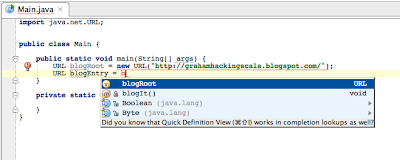
Below are screenshots of the different options you will get if you press Ctrl-Space in both Eclipse and IntelliJ IDEA for the same piece of code. Aside from the fact that Eclipse suggested every class beginning with 'B', note that IDEA doesn't suggest blogEntry, boolean or byte, because it knows these wouldn't compile. The really good news is that, if you hit Ctrl-Shift-Space in IDEA here instead of Ctrl-Space, it will just insert blogRoot; complete with semi-colon. Actually, Ctrl-Shift-Space would insert this code even without typing the 'b'.

Here's the different completion options in IDEA and when you should use them:
Ctrl-Shift-Space: Smart (Type-Aware) Completion
This is probably my favourite feature of IntelliJ IDEA. Whenever you are auto-completing at a location that has an expected type - for instance, on the RHS of an assignment or inside the parentheses of a method invocation - type-aware completion will greatly reduce the number of options that appear because it only displays expressions (variables, fields or methods) that match the expected type. This is the key combo that most often feels like magic to me. Sometimes I can just hit Ctrl-Shift-Space four or five times in a row and watch the code that was in my head appear on the screen. And the JetBrains guys are continuing to make this do even more magic: See 'Chained Java Code Completion' and 'Super Completion' at http://www.jetbrains.com/idea/features/code_assistance.html
Ctrl-Alt-Space: Out-of-Scope Class Name Completion
It's actually fairly rare that you'll want to import a new class or interface into a Java source file. Most of the time you auto-complete a class name, it's already in scope, either because it's in the same package, you've already imported it, or its in java.lang. That makes it a bit of overkill to show a list of every class in your classpath every time you try to autocomplete. So Ctrl-Space doesn't do that. But you do obviously need to bring in out of scope classes every now and then, so if you want to complete a class that you haven't already used, hit Ctrl-Alt-Space to see all matching class names. The rest of the time, just use Ctrl-Space to see the classes that you're already using. IntelliJ (like Eclipse) also supports initialised completion. So if you want to use the IllegalArgumentException class, type 'IAE' and hit Ctrl-Alt-Space to see a list of all classes whose first three capitalised words being with 'I', 'A' and 'E'.
Tab: Template Completion
If you know the short name for your template, e.g. "iter", just type it, then tab, voila. If you need to browse for a template, or you only know the first letter or two of the template (e.g. "it"), type what you know and hit Ctrl-J (on Windows and Linux, Command-J on Mac) to see a list of options.
Ctrl-Space: Everything Else
This is the one you use for everything else:
* class names that are already in scope
* methods or fields that don't match the expected type
* completing names when there is no expected type (e.g. invoking a void method)
* completing the declaration of names for variables, fields or parameters
It might seem daunting at first to have four autocomplete options rather than one. However, by giving the IDE a small hint about what kind of thing you're trying to complete, and with the IDE being a bit smarter in assessing what kinds of things might possibly compile if they were completed, the list of options that you are shown is shorter and less confusing than chucking everything in one jolly big list.
Below are screenshots of the different options you will get if you press Ctrl-Space in both Eclipse and IntelliJ IDEA for the same piece of code. Aside from the fact that Eclipse suggested every class beginning with 'B', note that IDEA doesn't suggest blogEntry, boolean or byte, because it knows these wouldn't compile. The really good news is that, if you hit Ctrl-Shift-Space in IDEA here instead of Ctrl-Space, it will just insert blogRoot; complete with semi-colon. Actually, Ctrl-Shift-Space would insert this code even without typing the 'b'.


Friday, January 29, 2010
Why Your Company Should Let You Use Scala at Work
Java at Work: An Increasingly Frustrating Experience
A colleague and I were writing a test in Java today and I had one of those "I can't believe it takes this much work to write this stupid function" moments. If you do any Scala programming but still do a lot of Java programming, you'll know exactly what I mean. I'll walk you through a mock of what we were doing and you can see why Scala just pummels Java when it comes to expressiveness. (Early warning: do not use the word "expressive" when trying to convince your manager to let you use Scala at work.)
So, here's the gist of the code that we were testing:
The lack of visual appeal isn't the only problem. Another problem is that, despite being trivial, it took more than a few seconds to write. An even more disturbing problem is that my colleague and I both spent another 30 seconds triple-checking this code to make sure it was doing what we wanted it to. Not because it's complex (it's not) or because we're stupid (we're not). We were checking it over because (a) it took too long to write for such a simple operation, so we thought maybe it could be simplified, and (b) there is so much noise in the code that it just LOOKED like a bear trap for stupid errors.
I quipped that the same function in Scala would be much shorter and easier to read. My colleague called me on it and asked what the Scala would look like, so I wrote some hacky Scala in a comment to give him the feel of it. It was, of course, slightly wrong, and turned out to be more complex than it needed to be, but I wrote it again when I got home and compiled it just to prove my point. Here's the
But its endearing qualities don't end at the reduced demands on screen lines and hard drive. The Scala implementation reads in a way that is so much closer to the intent of the function - so much closer than a for loop with a nested if, with a nested for, with a nested if, followed by four closing braces and a throw statement. The
To make a fair comparison, I will highlight that Scala has added one piece of noise to the implementation that wasn't present in the Java: the
For me, the best part about this code is that the combination of its succinctness, expressiveness and almost total lack of noise means that we wouldn't need to spend 30 seconds triple-checking it. Not only did it take such a short time to write that I could still remember the first key-stroke by the time I'd finished, but I can look at this code and see what it does without having to read it.
Hang On, I Thought This Blog Was About Using Scala at Work?
Actually, so far it's been about not using Scala at work, and how annoying that can be.
How can we change this situation?
Well, imagine you go to your boss and you say, "Hey, Boss. Can we start using Scala?" and he says, "Why?" and you say, "Um, 'cause it's a functional language so it's more expressive and it has monads and everything's immutable so it might help us to write better multi-threaded code" and he'll say? ... "Get back to work".
Well, the silly little method above, along with the issues it solved, is a perfect little use case for why Scala could be great for your company's software development. Forget all the functional paradigms and monadic, higher-kinded academia - these are just buzz words that dumb people use to sound important. (Kidding.) No, there are real, practical, business reasons your company should let you code in Scala. My experience, as demonstrated in the code here, is that Scala lets me write code faster and also makes it harder for me to get things wrong. Or, to rephrase that in managerese, it increases output and improves quality.
So, instead of pitching technical buzzwords at your boss, imagine trying this out: "Hey, Boss. How would you like it if I could write twice as much code in a day and have more confidence that it actually does what I intend it to?" Now you're speaking his language: Output and Quality. But why not go one better than imagining? Why not go and ask your boss now!
If your boss says YES, and you need to get up to speed with Scala, you'll probably want to grab one of these books:
Programming in Scala - Martin Odersky, Lex Spoon & Bill Venners (Artima)
Programming Scala - Venkat Subramaniam (The Pragmatic Programmers)
Programming Scala - Dean Wampler & Alex Payne (O'Reilly)
Beginner Scala - David Pollak (Apress)
Pro Scala - Gregory Meredith (Apress)
Disclaimer:
It's not my intention to represent Scala as being better than Java for every project in every organisation, or for any particular one at all. Obviously there are many more issues to consider when adopting a language than just those presented here. My claims that Scala increases output and quality are based only on my own anecdotal observations and not on any empirical evidence. You should make your own investigations before making any commitment to using Scala in a commercial context.
A colleague and I were writing a test in Java today and I had one of those "I can't believe it takes this much work to write this stupid function" moments. If you do any Scala programming but still do a lot of Java programming, you'll know exactly what I mean. I'll walk you through a mock of what we were doing and you can see why Scala just pummels Java when it comes to expressiveness. (Early warning: do not use the word "expressive" when trying to convince your manager to let you use Scala at work.)
So, here's the gist of the code that we were testing:
and here's the gist of the test that we wrote:
import java.util.ArrayList;
import java.util.List;

class AccountSummaryService {
    public List<CustomerSummaryDTO> getAccountSummaries() {
        return new ArrayList<CustomerSummaryDTO>();
    }
}

class CustomerSummaryDTO {
    private String name;
    private List<AccountSummaryDTO> accountSummaries;

    public String getName() {
        return name;
    }

    public List<AccountSummaryDTO> getAccounts() {
        return accountSummaries;
    }
}

class AccountSummaryDTO {
    private String name;
    private int balance;

    public String getName() {
        return name;
    }

    public int getBalance() {
        return balance;
    }
}
As you can see, I'm a bit of a fan of fluent interfaces, hence the use of Hamcrest matchers and the
import org.junit.Test;

import java.util.List;
import java.util.NoSuchElementException;

import static org.hamcrest.core.Is.is;
import static org.junit.Assert.assertThat;

class AccountSummaryServiceJavaTest {
    AccountSummaryService service = new AccountSummaryService();

    @Test
    public void getAccountSummaries() {
        List<CustomerSummaryDTO> result = service.getAccountSummaries();
        assertThat(balanceFor("Customer 1", "Account #2", result),
                   is(1000000));
    }

    private int balanceFor(String customerName, String accountName,
                           List<CustomerSummaryDTO> result) {
        for (CustomerSummaryDTO customer : result) {
            if (customer.getName().equals(customerName)) {
                for (AccountSummaryDTO account : customer.getAccounts()) {
                    if (account.getName().equals(accountName)) {
                        return account.getBalance();
                    }
                }
            }
        }
        throw new NoSuchElementException("Account not found");
    }
}
balanceFor() method. This makes for a nice, readable test, but boy is that balanceFor() method ugly! Considering the simple job it's doing, there is a lot of code and - the thing I especially hate - a lot of noise. I would say this code has a relatively low signal-to-noise ratio.The lack of visual appeal isn't the only problem. Another problem is that, despite being trivial, it took more than a few seconds to write. An even more disturbing problem is that my colleague and I both spent another 30 seconds triple-checking this code to make sure it was doing what we wanted it to. Not because it's complex (it's not) or because we're stupid (we're not). We were checking it over because (a) it took too long to write for such a simple operation, so we thought maybe it could be simplified, and (b) there is so much noise in the code that it just LOOKED like a bear trap for stupid errors.
I quipped that the same function in Scala would be much shorter and easier to read. My colleague called me on it and asked what the Scala would look like, so I wrote some hacky Scala in a comment to give him the feel of it. It was, of course, slightly wrong, and turned out to be more complex than it needed to be, but I wrote it again when I got home and compiled it just to prove my point. Here's the
balanceFor() method rewritten in Scala:You can see straight away that this function is shorter. Just syntactically, using Scala has removed a lot of the noise: theres no type declarations in the implementation; there's no verbose but meaningless local variable names because we can use _ to create anonymous functions; we're able to use
  def balanceFor(customerName : String, accountName : String, result :
                 Iterable[CustomerSummaryDTO]) =
      result.find(_.getName == customerName).get
        .getAccounts().find(_.getName == accountName).get
        .getBalance
== instead of .equals() with the same effect; the exception is thrown by the API because find() returns an Option; and, thanks to the power of Scala's API, we can even lose the braces because the whole function is just one expression.But its endearing qualities don't end at the reduced demands on screen lines and hard drive. The Scala implementation reads in a way that is so much closer to the intent of the function - so much closer than a for loop with a nested if, with a nested for, with a nested if, followed by four closing braces and a throw statement. The
find() function expresses what we are trying to do exactly; to a reader attempting to comprehend the code, its simplicity is profound when compared to the for statement and if statement that combined do the same thing but are spread over two lines in the Java version.To make a fair comparison, I will highlight that Scala has added one piece of noise to the implementation that wasn't present in the Java: the
.get call at the end of each of the first two lines, used to access the contents of the Option returned by find(). To anyone who has read an introductory Scala book, this will make immediate sense and to anyone that hasn't even seen Scala before, a 30-second explanation of Option should make everything pretty clear.Note: Some people believe that you should never use the .get function on Option - never, ever! I don't agree with them absolutely. In general, this function is probably not a good one to call if you're writing production Scala code, but I think it can still be useful in certain circumstances. See the comments if you want to know more.
For me, the best part about this code is that the combination of its succinctness, expressiveness and almost total lack of noise means that we wouldn't need to spend 30 seconds triple-checking it. Not only did it take such a short time to write that I could still remember the first key-stroke by the time I'd finished, but I can look at this code and see what it does without having to read it.
Hang On, I Thought This Blog Was About Using Scala at Work?
Actually, so far it's been about not using Scala at work, and how annoying that can be.
How can we change this situation?
Well, imagine you go to your boss and you say, "Hey, Boss. Can we start using Scala?" and he says, "Why?" and you say, "Um, 'cause it's a functional language so it's more expressive and it has monads and everything's immutable so it might help us to write better multi-threaded code" and he'll say? ... "Get back to work".
Well, the silly little method above, along with the issues it solved, is a perfect little use case for why Scala could be great for your company's software development. Forget all the functional paradigms and monadic, higher-kinded academia - these are just buzz words that dumb people use to sound important. (Kidding.) No, there are real, practical, business reasons your company should let you code in Scala. My experience, as demonstrated in the code here, is that Scala lets me write code faster and also makes it harder for me to get things wrong. Or, to rephrase that in managerese, it increases output and improves quality.
So, instead of pitching technical buzzwords at your boss, imagine trying this out: "Hey, Boss. How would you like it if I could write twice as much code in a day and have more confidence that it actually does what I intend it to?" Now you're speaking his language: Output and Quality. But why not go one better than imagining? Why not go and ask your boss now!
If your boss says YES, and you need to get up to speed with Scala, you'll probably want to grab one of these books:
From Amazon
From The Book Depository
Programming in Scala - Martin Odersky, Lex Spoon & Bill Venners (Artima)
Programming Scala - Venkat Subramaniam (The Pragmatic Programmers)
Programming Scala - Dean Wampler & Alex Payne (O'Reilly)
Beginner Scala - David Pollak (Apress)
Pro Scala - Gregory Meredith (Apress)
Disclaimer:
It's not my intention to represent Scala as being better than Java for every project in every organisation, or for any particular one at all. Obviously there are many more issues to consider when adopting a language than just those presented here. My claims that Scala increases output and quality are based only on my own anecdotal observations and not on any empirical evidence. You should make your own investigations before making any commitment to using Scala in a commercial context.
Subscribe to:
Posts (Atom)
